Yarrow

A live map of natural background radiation

Plug a Geiger counter into your computer and join a worldwide network of volunteers. Every ten minutes real counts go to a live, open map of the background dose rate, city by city.

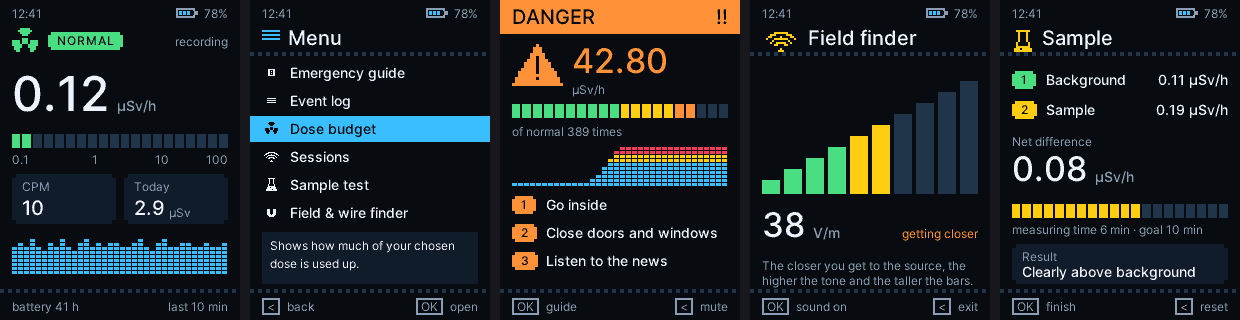
Screens of the Yarrow firmware: dose rate, menu, danger alarm, field finder, sample test
Open firmware, GPL-3.016 languages Windows · LinuxRaw counts onlyCredit for every valid bin

What is Yarrow?

Everywhere on Earth a little ionizing radiation passes through you all the time: gamma rays from the rocks and soil, the building you sit in, radon in the air and cosmic rays from space. It is harmless at these levels and it differs from place to place: granite reads higher than sediment, a mountain village higher than the coast. A network of cheap detectors, each watching its own corner, shows what normal looks like everywhere, so that unusual can be seen.

📡

You measure

A Geiger-Müller tube gives one pulse for each ionizing event. At background level that is about one every two seconds.

🗺️

We map

Counts from all detectors become the median dose rate of each city, over the last hour, 3 hours, 24 hours or 7 days.

🔎

Everyone can see

The map is open to everyone, with a history graph per place and a notice when readings are clearly higher than usual.

How it works

From the tube to the map in four steps.

The detector counts

The FNIRSI GC-03 with Yarrow firmware counts raw pulses of its J321 tube and keeps a pulse counter and a clock.

The monitor cuts bins

A small BOINC task reads the counter and cuts it into exact 10, 30 or 60 minute bins on the clock, sent every ten minutes.

The server checks

Impossible values are refused at once. A day later each stream must pass a statistical test. Only then bins count and earn credit.

The map shows it

Cities appear as points coloured by their median dose rate. Nothing finer than a city is ever sent or shown.

< 8080 - 150150 - 300300 - 600600 - 1500> 1500nSv/h

The detector: FNIRSI GC-03 + Yarrow firmware

The FNIRSI GC-03 is a pocket Geiger counter with a J321 tube, a colour display, a rotary knob, a battery and a USB port. Yarrow is open firmware written from scratch for it, because the original gives nothing a computer could use.

☢️

Dose rate you can trust

An adaptive averaging window: quiet at background level, quick when the level rises. Dead-time correction keeps strong sources honest.

🚨

Alarms and an emergency guide

Caution, danger and evacuate levels with hysteresis, sound, vibration and light, and a plain-language guide for what to do.

📒

A log that survives anything

From one-second detail for weeks to hourly records for years, power-fail safe, with alarm moments saved every second.

📊

Sessions, budget and sample test

Track a daily dose budget, record sessions and compare a sample against the background with a statistical verdict.

⚡

Field and wire finder

Electric and magnetic field readings with a rising tone and bars as you approach a source or a wire in the wall.

🎨

Themes, 16 languages, battery care

Sixteen colour themes, 16 languages, a battery gauge with health and charge cycles, and a self test of the tube, sensors and clock.

🔬

Calibration wizard

Put the detector next to any source whose dose rate you know and it finds the sensitivity of your own tube (default: 180 counts per minute for 1 µSv/h).

🔌

A simple USB protocol

Raw pulse counter, identity, calibration and clock over a USB serial line, documented and open. This is what the monitor reads.
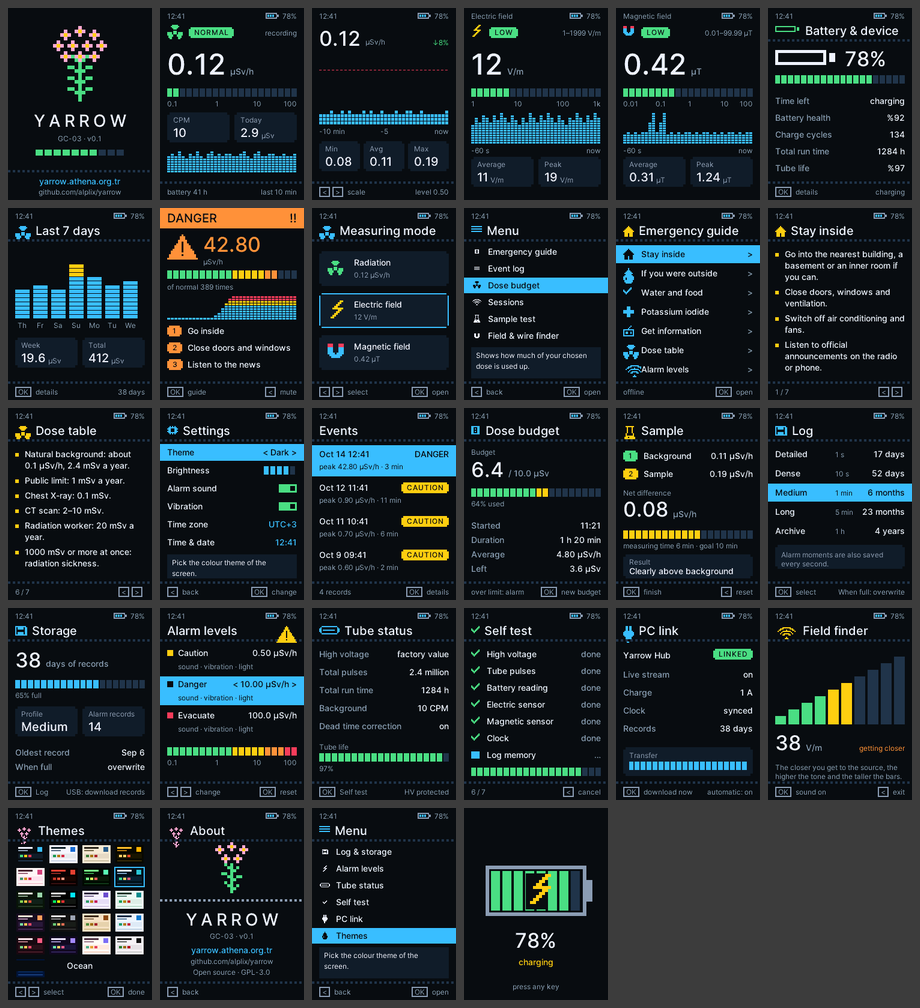
All screens of the Yarrow firmware

Get the firmware

One file per language. Pick yours:

  1. Switch the detector off, hold OK, press the power key and plug in the USB cable.
  2. A drive appears. Copy the .bin file of your language onto it.
  3. The detector restarts with Yarrow. The original bootloader and the factory tube calibration are never touched.

Step-by-step instructions and the source code · GPL-3.0

The monitor and the counters it reads

The BOINC part of Yarrow is a small program that uses almost no CPU. It looks for a counter every 15 seconds, cuts the pulse counter into exact bins and sends them as BOINC trickles. A bin is only kept when it is exact: both edges read in the right second, the tube voltage on the whole time, the counter not restarted, the clock not jumped. Nothing is ever estimated or padded. Builds for Windows (x64, x86, ARM64) and Linux (x86-64, ARM64, ARMv7).

CounterConnectionState
FNIRSI GC-03 + YarrowUSB serialAvailable
Radioactive@Home USB counter (SBM-20; boards 2.01 to 2.60, the kit, and 3.01)USB HIDAvailable
GQ GMC-300 / 320 / 500 / 600USB serialAvailable

The rule for every counter stays the same: only raw pulse counts from the tube are accepted, never a rate the counter has smoothed itself.

Yarrow Hub: the desktop app

Yarrow Hub works on its own, without BOINC. It shows the live dose rate of your counter, keeps your history on your computer, draws graphs and statistics, shows the dose in nSv/h, µSv/h or µrem/h, rings an alarm at levels you choose and exports CSV. It runs with the FNIRSI GC-03 and with the Radioactive@Home counters. With a GC-03 it also sets the clock, calibrates the tube and installs firmware.

Keeping the data honest

A network of home instruments needs to trust its numbers, and Yarrow cannot lock a volunteer's computer. So it makes the checks that fake or broken data cannot pass.

Physics at the door

Impossible bins are refused at once: a dose rate over 1,000 µSv/h, data from the future or the distant past, an impossible dead time or sensitivity.

The statistics test

A day later each stream is tested. Real counts are random, so their spread must match Poisson statistics. A made-up constant is too smooth and fails.

Identity and limits

Every detector has its own identity from its chip number. A copy of another detector's counts, a recorded day sent again or a dose rate far from the city's other detectors is held and looked at. New detectors earn a part of the credit that grows with a consistent history; up to 5 detectors per volunteer, a daily cap.

The crowd

The map shows the median of a city, so one wrong detector cannot move it. Credit comes only after the checks.

Every valid bin is worth 10 credits (up to 150 bins per detector per day), granted about a day after the data arrived, once the checks are passed.

Privacy

A point on the map is a city, the name you type in your preferences. Nothing finer than a city is ever sent or shown: no address, no GPS, no street. The volunteers table shows BOINC user names and amounts, never places. City positions come from GeoNames (CC BY 4.0), the world map from Natural Earth (public domain).

Linux and Raspberry Pi

On Linux the BOINC client runs as its own user and may not open USB devices, so the task says No detector found although a test program finds the counter. One command lets BOINC open the counters Yarrow reads (it only touches those):

curl -fsSL https://raw.githubusercontent.com/alplix/yarrow/main/linux/yarrow-linux-setup.sh | sudo sh
sudo systemctl restart boinc-client

Then unplug the counter and plug it in again. Works the same on Raspberry Pi OS. More details and what to look for in the task log: docs/linux.md.

Join in 5 steps

  1. Get a counter: a FNIRSI GC-03 with the Yarrow firmware (above), or use a Radioactive@Home or GQ GMC counter you already have.
  2. Join BitBOINC and attach your computer in the BOINC Manager.
  3. In your project preferences tick the Yarrow monitor, and enter your country (two letters), city, bin length and, if you like, your detector.
  4. Plug the detector into the computer and switch it on (a GC-03: leave it on the main screen). The monitor finds it by itself.
  5. Leave it running. The first bin arrives at the next 10-minute mark; the longer it runs, the better the checks and the map like it.

Questions

Does it use my CPU?

Practically not. The monitor reads a counter about once a second and sends a small message every ten minutes.

Where should I put the detector?

Anywhere that stays the same, a shelf or a desk is fine. Move it rarely, the building and the surroundings are part of the reading.

My value differs from my neighbour's.

That is normal: ground, building and tube differ, and one detector has a counting noise of several percent. Compare the 24-hour or 7-day value and read the pattern.

What is a normal value?

About 50 to 200 nSv/h. Granite and some volcanic rocks, stone buildings and high altitude raise it.

Is this an official warning system?

No. It is information from volunteers' hobby instruments. For official information follow your national authority.

Can I use another Geiger counter?

Yes. Besides the FNIRSI GC-03 the monitor reads the USB counters of the old Radioactive@Home project (no flashing needed) and the GQ GMC family. Only raw pulse counts are accepted. Tell us what you have: a new counter is one small driver away.

Can I go back to the original firmware?

Yes. The original bootloader and the factory tube calibration are never touched; copy the original file the same way.